Monitor arms on a narrow desk: when they help (and when they do not)
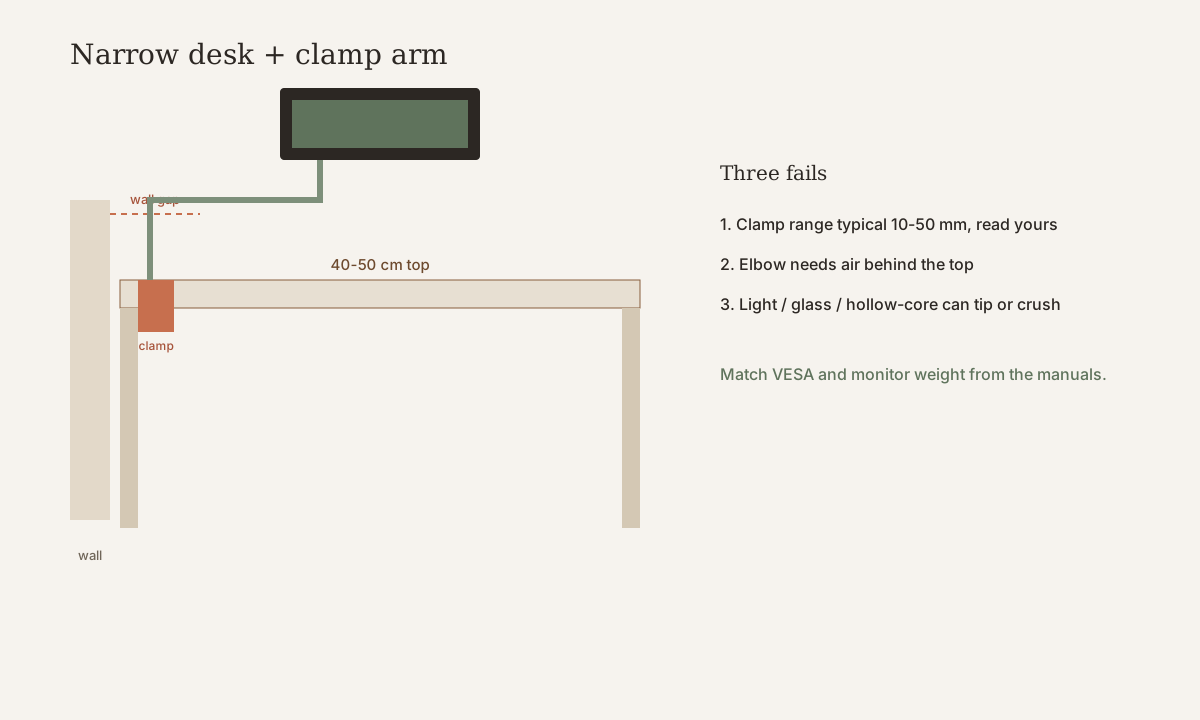
A monitor arm can give you the writing space a 15.7–19.7 in (40–50 cm) desk does not have — if the clamp fits, the wall allows the swing, and the desk is heavy enough not to tip. If any of those three fail, the arm is worse than the stock stand.
Read the arm’s spec sheet and the monitor’s manual. Match them to the desk you actually have.
What “narrow” means here
Narrow, on this site, means a desktop about 15.7–19.7 in (40–50 cm) deep, often 31.5–47.2 in (80–120 cm) wide. See the desk size guide.
A 27-inch monitor on its factory stand can eat 8–11 in (20–28 cm) of that depth. It is half the desk. An arm can reclaim that depth if the clamp and the wall allow. The arm still needs a mounting strip at the rear, and the screen still needs a comfortable viewing distance.
On a 15.7 in (40 cm) desk, gaining 5.9–7.9 in (15–20 cm) of open surface is the point: a place to write. On a 31.5 in (80 cm) desk, the clamp usually lives at the rear center or rear corner.
Three failure modes on small desks
1. The clamp will not fit. A rear lip, a too-thick top, a too-thin cheap top, or glass will stop a C-clamp. Typical clamp ranges are often about 0.4–2 in (10–50 mm) — typical, not universal. Read your arm’s printed range. A decorative waterfall edge can be thicker than the flat top. Glass is a veto, not a maybe.
2. The arm hits the wall. Many small desks sit with 0–2 in (0–5 cm) of air behind them. An arm’s elbow needs room to fold. If the desktop is flush to the wall, a rear clamp may fit the thickness and still be unusable because the joint has nowhere to go. Pull the desk out, or skip the arm.
3. The desk is too light and tips. When you swing a screen fully forward or to the side, you put a lever on a small table. A light folding desk, a hollow-core slab on thin legs, or a wall-leaning table can lift a rear foot. If the desk rocks with the stock stand, an arm will not make it calmer. If the desk wobbles, do not use the arm.
Checklist before you buy
Desk thickness
Measure the rear edge where the clamp would sit, including any lip. Typical C-clamp ranges often cover about 0.4–2 in (10–50 mm). Label that typical. Your arm may be narrower (some clamps max out near 30–40 mm / 1.2–1.6 in) or built for thicker worktops. If your top is outside the printed range, the clamp will refuse to close or bite only the veneer. If the top is under about 0.6 in (15 mm) and feels hollow, treat a tight clamp as a crush risk.
Rear overhang vs the wall
You need some rear lip the clamp can grab, or a grommet hole the arm is designed to use. A desk shoved flush to the wall often cannot take a rear clamp. You also need a few centimeters behind the desk for the arm’s joints.
Measure overhang behind the rear legs, the gap from the rear edge to the wall, and whether a baseboards or radiator already occupies that gap. If the wall gap is 0–2 in (0–5 cm) and you cannot pull the desk forward without blocking a door or a bed, a rear-clamp arm is usually the wrong tool.
Monitor weight and VESA
Turn the screen around, or read the manual.
- VESA pattern: commonly 75 × 75 mm or 100 × 100 mm. If the monitor has no VESA holes, an arm that expects VESA will not mount without extra plates, which add weight and bulk.
- Weight: use the figure in your monitor’s manual. Do not copy a weight from a similar-looking size. Two 27-inch screens can differ by a lot. Compare that number to the arm’s rated range, including the minimum (some gas arms will not hold a very light screen) as well as the maximum.
Desk construction
Honeycomb and hollow-core cheap tops can crush under a clamp. The core is often cardboard or a light grid. A clamp can dent the top, crack it, or loosen until the arm sags.
Solid wood or dense particleboard is a better host. A folding suitcase desk, glass, or hollow-core laminate is a poor host. If the underside oil-cans (flexes) when you press it, do not clamp an arm there.
When an arm helps
- 15.7 in (40 cm) depth plus one 24–27-inch screen. The stock stand uses too much of the only depth you have. One screen, one arm, rear clamp that actually fits: this is the clean win.
- You need to push the screen away to write. If the desk is also a mail table, a meal table, or a sketch surface, parking the screen toward the wall is the feature.
- A bedroom desk where you want the screen gone at night. Sliding the panel toward the wall, or turning it to face the wall, cuts the glowing rectangle from the pillow. Pair that with the bedroom desk guide. The arm does not fix sleep on its own. It makes it possible to put the screen to bed.
When an arm does not help
Dual monitors on an 80 cm × 40 cm (31.5 × 15.7 in) desk are usually a bad idea. Two panels need width the desk does not have. An arm does not create that space. Use one screen, or get a wider desk.
Other poor matches:
- Glass top. Do not clamp an arm to glass.
- Wall-flush folding desk. A clamp arm either blocks the fold or requires drilling. Most renters lose twice: holes, and a desk that no longer folds flat. See folding vs corner vs sit-stand for renters.
- Ultrawide on a light folding table. The panel is a sail. Fully extended, the arm is a lever. This fails the tip test even when the VESA holes exist.
If you never move the screen, a low-profile stand may be calmer. Arms pay off when you use the motion.
C-clamp vs grommet vs wall-mount
C-clamp. The default for a rented desk you do not want to drill. It needs a rear edge the clamp can grip, the right thickness, and a top that will not crush. On a narrow desk, place it at the rear, not on the side where your elbow lives. Watch for a clamp body that hangs into your knees.
Grommet. The arm bolts through a hole in the top. That is stable, and it can solve a desk with no rear overhang. It also leaves a hole. If you own the desk and already have a cable grommet of the right diameter, this can be the cleanest mount. If the desk is a rental you must return unmarked, a new grommet hole is often a no.
Wall-mount. Often a renter veto. You drill the wall and you patch on the way out. Do not treat a wall arm as the small-desk workaround unless you have written permission to drill.
Setup tips with measurements
This is furniture and layout guidance, not medical advice.
- Distance. Keep the screen roughly an arm’s length away. For many people that lands around 20–28 in (50–70 cm). Typical, not a rule. Adjust until you are not craning.
- Height. Set the top of the screen at or slightly below eye height when you sit the way you actually sit. High and close is a neck bend. Begin lower than you think, then raise in small steps.
- Centering. On a 31.5–39.4 in (80–100 cm) width, center the panel on your body, not on the geometric middle of the desk if a wall already stole one side.
- Extension. Do not live with the arm fully stretched toward you. Fully extended is the tip-and-wobble position. Leave some fold in the elbow.
A lamp arm or microphone arm is a second lever on a small top.
Cables, parking, and sit-stand
Run the monitor’s power and video through the arm’s cable channel so a sit-stand desk, or a screen you park at night, does not yank USB or HDMI. Leave a slack loop at the clamp equal to the arm’s full travel, then follow the cable management guide for 80–100 cm desks for the strip, the tray, and the floor. Two bundles still apply: monitor cables in the arm, laptop charger in its own path.
Move the screen through work, write, and parked-for-the-night. Then, if the desk rises, run it to the top. If anything goes taut, lengthen that loop. If the desktop lifts a foot, remove the arm.
Disclaimer
This is furniture and layout guidance for small rented rooms, not a safety certification. Follow the arm and monitor manuals for weight limits, VESA, and clamp range. If the desk wobbles, do not use the arm. If a glass top, a hollow-core slab, or a wall-flush fold is what you have, keep the factory stand or change the desk — do not force a clamp.
Related guides
What to look for (named examples)
Criteria first, then our constraint scores. Public-spec examples so you can search a real listing — not Amazon stars, and not a claim that we sat in a lab with a dozen desks.
Disclosure. Outgoing links go to the maker’s search or a generic retailer search until a partner tag is connected. After that, some links may be affiliate links — we may earn a commission if you buy, at no extra cost to you. Rankings on this site are our constraint scores (depth, leftover width, clamp, renter risk, cable drop). They are not Amazon stars or scraped reviews. We do not invent first-person lab tests.
Typical listing (e.g. VIVO / HUANUO class)
Single gas-spring monitor arm (2–8 kg class)
Our score 4.2 / 5 · depth 5 · width 4 · renter 4
- Solves: Reclaims 5.9–7.9 in (15–20 cm) of depth on a 15.7–19.7 in (40–50 cm) desk by lifting the factory stand off the top.
- Fits: One 24–27 in VESA panel; rear lip in the printed clamp range; wall gap so the elbow can fold; desk that does not tip.
- Skip if: Glass, hollow-core crush risk, dual monitors on 31.5 in (80 cm), or 0–2 in (0–5 cm) wall gap you cannot widen.
Typical public listings in this class: C-clamp about 0.4–3.1 in (10–80 mm), load about 4–18 lb (2–8 kg), VESA 75/100. Read *your* arm and *your* monitor manuals — two 27 in panels are not the same weight.
Check the current listing · search “single monitor arm gas spring VESA 2-8kg”