Updated 2026-09-01
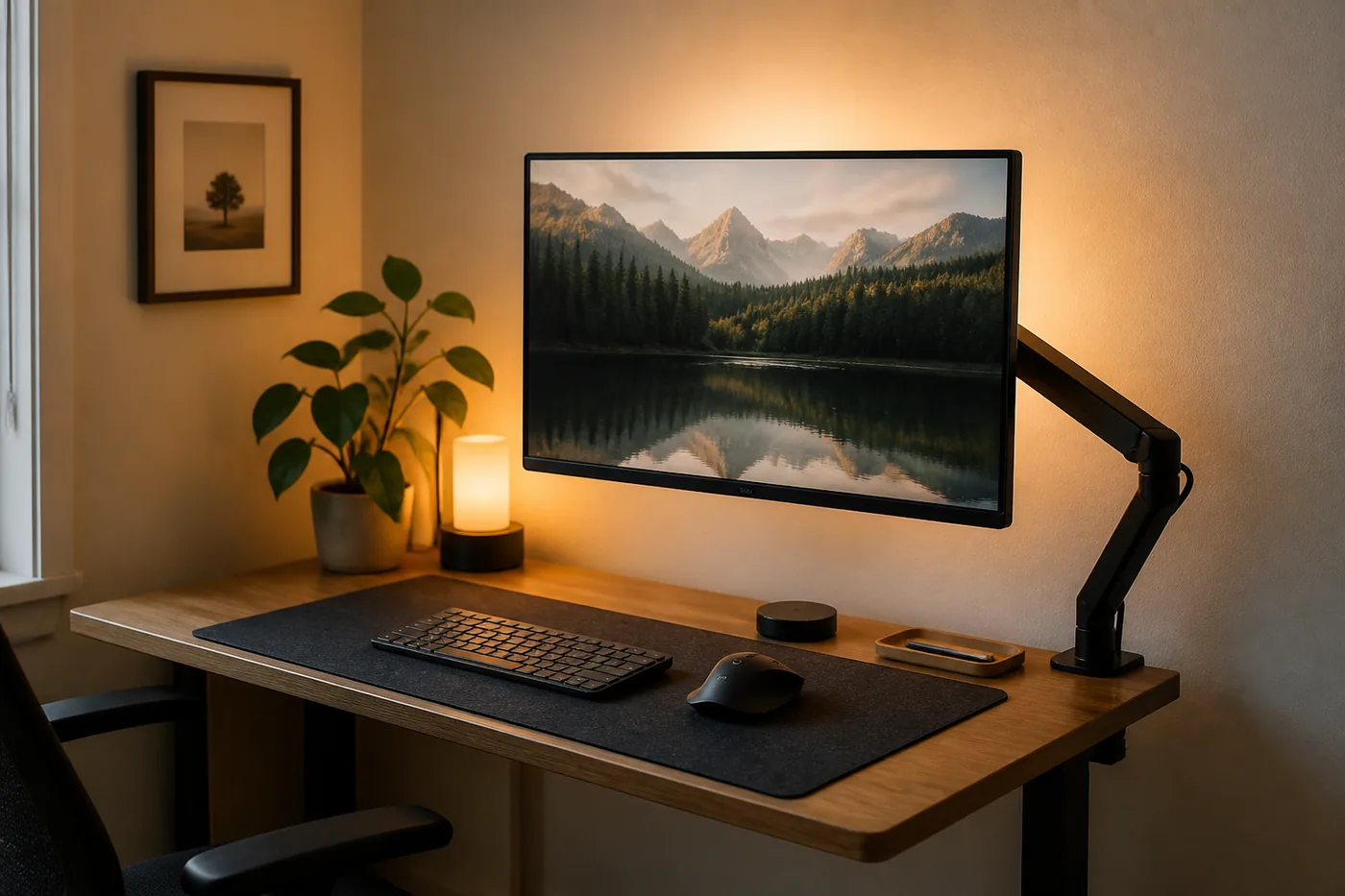
One-monitor setups that look intentional
A single monitor on a small desk can look sparse — or deliberate. The difference is composition: one panel centered on a calm mat, a stand or arm that fits the desk you own, cables that disappear behind the rear edge, and optional soft light behind the screen as a category choice, not a gadget pile.
This page is for 31.5–47.2 in (80–120 cm) walls and shallow tops where two panels usually fight the furniture. Gear criteria and calm layout — not a lab test.
Why one screen often looks more finished than two
Two monitors signal “workstation.” One monitor can signal “furniture that works.” In a bedroom or living room, that softer signal matters. Guests read a single centered panel as part of the room; they read a dual clamp forest as an office that spilled downstairs.
One screen also protects depth. On a 15.7–19.7 in (40–50 cm) desk, each factory stand eats precious centimeters. One stand (or one arm) leaves a writing strip. Two stands often leave none.
Intentional does not mean empty. It means every object on the top has a job: panel, input device, lamp, palm tray. Everything else goes vertical — storage that frees an 80–100 cm desk.
Why dual often fails on 80–120 cm walls
Start with the wall, not the wishlist. The desk size guide already flags dual as a poor default on short walls.
Width. Two 24-inch-class panels side by side often want about 43–51 in (110–130 cm) of desk once bezels and side margin count. On an 31.5 in (80 cm) desk, something hangs off or angles into a V that steals depth. On 39.4 in (100 cm), dual can sit and still leave no notebook room. On a 47.2 in (120 cm) wall, the desk rarely gets the full run once door swing, radiator, or nightstand claims a slice.
Depth. Angled dual setups push outer glass closer to your face and erase the middle writing band — the band that makes a small desk usable.
Arms and clamps. A dual arm is a heavier lever on a light apartment desk. Even when VESA fits, the clamp, wall gap, or tip risk may not — read monitor arms on a narrow desk before assuming an arm invents space.
Room signal. In a living room, dual glow behind a sofa reads as permanent office. Soft boundaries fight that look; two panels usually win the wrong way — soft boundaries for living-room desks.
If you mostly need reference text beside a document, try one panel plus a laptop for short bursts before you buy width you do not have.
Composition: mat, single panel, optional bias light
Think of the desktop as a small stage. Three pieces carry most of the intentional look.
Desk mat
A mat defines the work rectangle the way a rug defines a living-room zone.
Size. For a 31.5 in (80 cm) desk, about 70–80 cm wide × 30–40 cm deep (27.6–31.5 in × 12–16 in) usually frames keyboard and mouse. For a 39.4 in (100 cm) desk, about 80–90 cm × 35–40 cm (31.5–35.4 in × 13.8–16 in) often balances. Leave a finger of bare desktop at the sides for a framed look, or run edge-to-edge if the surface is scarred.
Material. Smooth enough for a mouse; thick enough to feel decent under your wrists; not so spongy that a mouse sinks.
When to skip. Skip on a fold-away top that must close flat if the mat adds bulk you will resent. Skip rubber backs that stain rental veneer — test a corner or use a washable cloth mat.
Single panel placement
Center the panel on the mat’s rear half, or align it with your seated midline if you write off to one side. Leave about 2–4 in (5–10 cm) in front of the bezel for a notebook edge.
Prefer one size class that matches how far you sit. On shallow desks, people often sit about 19.7–29.5 in (50–75 cm) from the glass for a 24–27 in class screen — a planning range, not a medical standard. If the panel feels huge, it may be too wide for the wall; try a smaller diagonal or rethink the layout before stacking gadgets.
Optional bias light (category)
A bias light or soft backlight sits behind the monitor, aimed at the wall, so wall glow frames the panel. As a category, look for:
- Light that washes the wall, not your eyes
- Warm-leaning white for evening living rooms; neutral for daytime camera color if you care
- USB or low-draw power that can share the under-desk strip
- A strip or puck hidden behind the panel — if you see LED dots from your chair, aim or diffuse again
When to skip. Skip in a bedroom if glow reaches the pillow — bedroom desk without wrecking sleep. Skip color-cycling modes in a shared room; static soft white reads as furniture. Skip stacking bias light, lightbox, and bright task lamp on glossy surfaces. Bias light does not fix window glare — move the desk or add a shade.
Arm vs stand — criteria, not load guesses
Choose mount type with the desk in front of you, not with a weight number invented from a blog.
When the stock stand is enough
Keep the factory stand if the desk depth still leaves a writing strip, you rarely push the screen away, the desk is too light/thin/glass/fold-away for a clamp, or you want the simplest shutdown. A low compact stand often looks cleaner than an arm you never move.
When an arm earns its place
Consider an arm when you need to reclaim depth on a 15.7–19.7 in (40–50 cm) top, park the panel toward the wall at night, or swing it aside to write. Do not invent load ratings here. Match:
- Your monitor’s VESA pattern and manual weight to the arm’s printed range (including any minimum)
- Desk thickness and rear edge shape to the clamp or grommet spec
- Wall gap behind the desk to the arm’s fold
Full checklist: monitor arms on a narrow desk. If that guide says no, believe it.
Visual criteria once mounted
Route video and power along the arm so the floating panel still looks attached to the room. Keep the panel parallel to the rear edge unless a slight angle kills a reflection. Leave wall breathing room so optional bias light can wash evenly.
Lamp and cable partners for a clean rectangle
A beautiful panel with a cable waterfall still looks accidental.
Lamp. Light the keyboard zone without washing the screen. Clamp lamps free depth; base lamps need a rear-corner budget. Beam, glare, and warm-vs-cool criteria: desk lamp criteria for tiny desks. Warmer task light usually sits kinder next to lounge lamps after hours; bright neutral can help for camera calls.
Cables. One under-rear strip, two bundles (monitor / laptop), nothing on the walk path — cable management for 80–100 cm desks.
Shutdown. Sleep the panel, kill the task light, leave bias light off if the room becomes a lounge, clear the front of the mat. Intentional setups stay intentional at 21:00, not only at noon.
When dual is still needed
One monitor is a strong default on small walls. Dual (or ultrawide-plus-laptop) still wins when:
- Your job displays two live, non-negotiable surfaces for long stretches, and window-switching costs real errors
- You can give the desk about 47.2–63 in (120–160 cm) of true clear width and about 23.6 in (60 cm) of depth after measuring doors and radiators
- The desk structure can hold the mounts without tip or crush risk
- The room can accept the office signal (a door helps; a soft-bound living room often does not)
Even then, try one external panel + laptop as temporary dual before buying a second external. For review-and-type days, a laptop as the second surface is often enough criteria-wise — try that before you buy another external panel.
If dual is required, stop forcing it onto a 31.5 × 15.7 in (80 × 40 cm) top. Change the desk or the wall. Cosmetics will not invent centimeters.
Comfort layout note (not medical advice)
People ask where the screen should sit “for ergonomics.” On this site we talk about comfort layout only: a panel you can see without hunching toward a tiny laptop, a mat that feels decent under your wrists, a lamp that does not blast your eyes in a dark room, and a chair rollback you measured yourself.
That is not medical advice, not physiotherapy, not a diagnosis or treatment for pain, eye strain, headaches, or sleep problems, and not an occupational-health standard. If you have pain or a medical concern, talk to a qualified professional. Furniture criteria cannot replace that.
Practical comfort checks without turning this into a clinic:
- Can you read the screen without sliding to the front edge of the chair?
- Is there space to rest your forearms, or are bricks eating that strip?
- Does evening glow from the panel or bias light keep the room feeling like noon?
Adjust layout and brightness first. Do not collect gear as a substitute for breaks or clinical care.
Related guides
- Monitor arms on a narrow desk
- Desk size guide
- Desk lamp criteria for tiny desks
- Cable management on an 80–100 cm desk
- Storage that frees an 80–100 cm desk
- Soft boundaries for a living-room desk
- A bedroom desk without wrecking sleep
Note
Typical sizes and viewing distances are planning ranges — confirm furniture specs, VESA and weight from your manuals, and your lease before clamping or drilling.
What to look for (named examples)
Criteria first, then our constraint scores. Public-spec examples so you can search a real listing — not Amazon stars, and not a claim that we sat in a lab with a dozen desks.
Disclosure. Outgoing links go to the maker’s search or a generic retailer search until a partner tag is connected. After that, some links may be affiliate links — we may earn a commission if you buy, at no extra cost to you. Rankings on this site are our constraint scores (depth, leftover width, clamp, renter risk, cable drop). They are not Amazon stars or scraped reviews. We do not invent first-person lab tests.
Category
Felt or cloth desk mat ~31.5 × 15.7 in (80 × 40 cm)
Footprint 31.5 × 15.7 in (80 × 40 cm)
Our score 3.3 / 5 · depth 3 · width 4 · renter 4
- Solves: Frames one keyboard, mouse, and panel so a single screen looks intentional on a short top.
- Fits: An 31.5–39.4 in (80–100 cm) desk; leave a finger of bare wood at the sides, or run edge-to-edge if the veneer is scarred.
- Skip if: A fold-away top that must close flat, or a rubber back that stains rental veneer (test a corner).
Category size, not a ranked SKU. Aim near 27.6–35.4 × 11.8–15.7 in (70–90 × 30–40 cm) depending on desk width.
Check the current listing · search “felt desk mat 80x40”
Typical listing (e.g. VIVO / HUANUO class)
Single gas-spring monitor arm (2–8 kg class)
Our score 4.2 / 5 · depth 5 · width 4 · renter 4
- Solves: Reclaims 5.9–7.9 in (15–20 cm) of depth on a 15.7–19.7 in (40–50 cm) desk by lifting the factory stand off the top.
- Fits: One 24–27 in VESA panel; rear lip in the printed clamp range; wall gap so the elbow can fold; desk that does not tip.
- Skip if: Glass, hollow-core crush risk, dual monitors on 31.5 in (80 cm), or 0–2 in (0–5 cm) wall gap you cannot widen.
Typical public listings in this class: C-clamp about 0.4–3.1 in (10–80 mm), load about 4–18 lb (2–8 kg), VESA 75/100. Read *your* arm and *your* monitor manuals — two 27 in panels are not the same weight.
Check the current listing · search “single monitor arm gas spring VESA 2-8kg”
Find what fits my space
When the wall is 31–47 in (80–120 cm) and the lease matters.