Clamp-only upgrades for a rented desk
The no-drill hardware ranking is the category list: clamps beat tension, tension beats adhesive, drill is last. This page is the desk stack — how many clamps a 31–39 in (80–100 cm) rented top can host before they fight.
It is household caution, not legal advice. Read your lease.
The one-lip problem
Most compact desks give you one rear lip and two short sides. Every clamp wants that lip. On a 31.5–39.4 in (80–100 cm) top you can usually keep two, sometimes three, if they do not share the same 4 in of edge.
Order that usually works
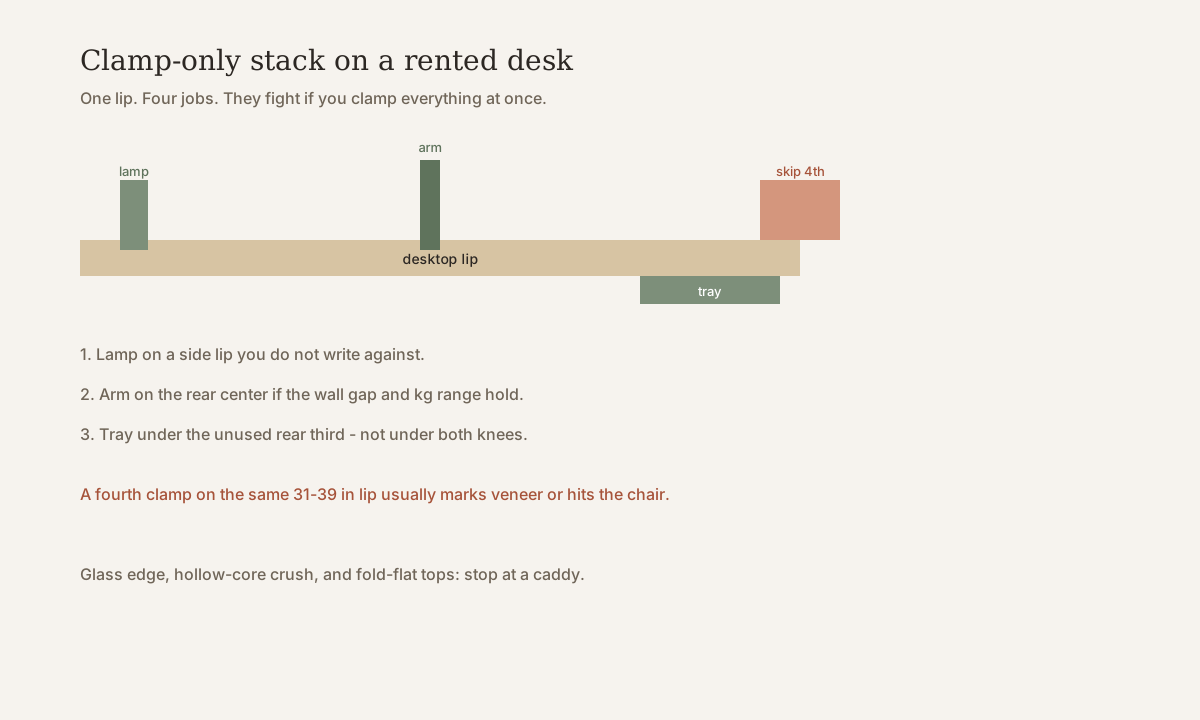
- Lamp on a side lip you do not write against. Task light without a base stealing 16–20 in of depth. Criteria: desk lamp.
- One rear-center arm — only after clamp range, wall gap, and tip tests. 24–27 in: narrow-desk arm. 32 in class: 32 in arm.
- Tray under the unused rear third, not under both knees. If the lease forbids underside screws, use a clamp tray or skip to a floor brick. See cable management for trays vs one-plug desk if you can drop most cables.
The fourth clamp — extra shelf, headphone hook, second light — is how veneer gets a jaw print and how your chair hits a metal body. Put that job in a caddy.
Thickness and construction
Measure the edge where the jaw will sit, including any waterfall lip.
| Top | Clamp outlook |
|---|---|
| Solid wood or dense particleboard, ~0.6–1.2 in (15–30 mm) | Default yes, if the printed range matches |
| Thick “live edge” or decorative waterfall | Measure the jaw zone, not the flat field |
| Hollow-core / honeycomb | Crush risk. One light lamp maybe; skip a monitor arm |
| Glass | Veto |
| Fold-flat suitcase desk | The clamp blocks the fold or scars the only top you can pack |
Typical C-clamp ranges are often about 0.4–2 in (10–50 mm) or 0.4–3.1 in (10–80 mm). Read your clamp. Felt or rubber jaw pads save finish. If the underside oil-cans when you press, stop.
What each clamp is for (criteria, not a kit)
Lamp. Solves glare without a base. Fits a lip you do not rest a wrist on. Skip if the beam hits a pillow — webcam light and bedroom desk.
Arm. Solves factory-stand depth. Fits one VESA panel and a desk that does not tip. Skip dual arms on this width.
Tray. Solves the brick on the walk path. Fits an underside you may mark or a clamp tray that does not steal knee room — knee clearance. Skip if you already have one floor plug and no strip.
Named examples at the end (TERTIAL-class clamp lamp, 2–8 kg arm) are public listing classes. Constraint scores are ours, not Amazon stars. Disclosure sits with the picks.
Storage without a wall plug
Vertical storage is still the first move — storage that frees 31–39 in. A pegboard that needs wall screws is not a clamp upgrade. Freestanding frames and side towers beat a fourth clamp.
Tension rods belong to the hardware ranking (curtains, not monitors). Do not tension a monitor across a rented corner.
Skip if
- The top is glass or fold-flat.
- You need four add-ons and will not use a caddy.
- The lease treats any mark as damage and you have no pad between jaw and veneer.
- You have not measured lip thickness.
Two clamps that work beat four that scar the only desk you can take to the next apartment.
Quick answers
Can I upgrade a rented desk without drilling?
Yes if the top has a solid lip the clamp can bite: lamp first, then one arm or one tray — not four clamps on the same 31–39 in edge. Glass, hollow-core, and fold-flat tops usually stop at a caddy.
How is this different from the no-drill hardware ranking?
The hardware page ranks clamps vs tension vs adhesive vs drill. This page is the desk-specific stack: which clamps share one lip without fighting.
Will clamps damage a rental desk?
They can crush veneer, leave jaw marks, or oil-can a hollow top. Use felt pads, stay inside the printed thickness range, and skip glass. Confirm your own lease before anything that marks wood.
What to look for (named examples)
Criteria first, then our constraint scores. Public-spec examples so you can search a real listing — not Amazon stars, and not a claim that we sat in a lab with a dozen desks.
Disclosure. Outgoing links go to the maker’s search or a generic retailer search until a partner tag is connected. After that, some links may be affiliate links — we may earn a commission if you buy, at no extra cost to you. Rankings on this site are our constraint scores (depth, leftover width, clamp, renter risk, cable drop). They are not Amazon stars or scraped reviews. We do not invent first-person lab tests.
IKEA
TERTIAL work lamp (clamp)
Our score 4.2 / 5 · depth 5 · width 5 · renter 4
- Solves: Task light without a base stealing 15.7–19.7 in (40–50 cm) of depth.
- Fits: A solid rear or side lip the clamp can bite; beam aimed at the keyboard zone, not the pillow.
- Skip if: Glass edge, crumbling veneer, or a fold-away top that must close flat against the clamp body.
Public IKEA listing: clamp work lamp, articulated arm. Confirm shade size against your sit-test glare.
Check the current listing · search “IKEA TERTIAL clamp lamp”
Typical listing (e.g. VIVO / HUANUO class)
Single gas-spring monitor arm (2–8 kg class)
Our score 4.2 / 5 · depth 5 · width 4 · renter 4
- Solves: Reclaims 5.9–7.9 in (15–20 cm) of depth on a 15.7–19.7 in (40–50 cm) desk by lifting the factory stand off the top.
- Fits: One 24–27 in VESA panel; rear lip in the printed clamp range; wall gap so the elbow can fold; desk that does not tip.
- Skip if: Glass, hollow-core crush risk, dual monitors on 31.5 in (80 cm), or 0–2 in (0–5 cm) wall gap you cannot widen.
Typical public listings in this class: C-clamp about 0.4–3.1 in (10–80 mm), load about 4–18 lb (2–8 kg), VESA 75/100. Read *your* arm and *your* monitor manuals — two 27 in panels are not the same weight.
Check the current listing · search “single monitor arm gas spring VESA 2-8kg”